



文章最后更新时间:
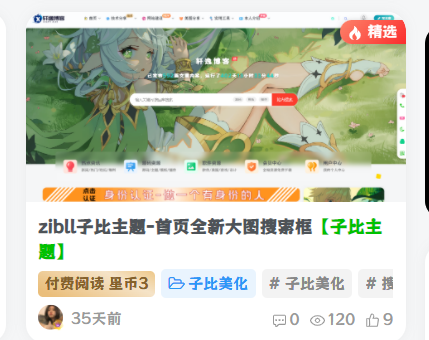
效果如图
简介:
在子比主题文章封面图左上角显示一个精选标识,可自定义替换文字,提高对文章的阅览定位。后台设置勾选即可。
1、编辑文章的时候勾选是否精选文章

教程:
1、将以下代码直接放到zibll\inc\options\metabox-options.php下方:
//META BOX SETTING
CSF::createMetabox('mrhe_jingxuan', array(
  'title'     => '精选',
  'post_type' => array('post', 'page', 'plate', 'forum_post'),
  'context'   => 'advanced',
  'data_type' => 'unserialize',
));
CSF::createSection('mrhe_jingxuan', array(
  'fields' => array(
    array(
      'title'   => __('是否精选文章', 'https://www.xzxs8.com'),
      'id'      => 'jx',
      'type'    => 'Checkbox',
      'label'   => '是否精选文章',
      'default' => false // or false
    ),
  ),
));
2、将以下代码放到zib-posts-list.php文件中,如图位置:
![图片[3]-子比主题增加精选-小扎仙森](https://geeke.jikeboss.cn/wp-content/uploads/2024/01/2024012109541835.png)
此文章仅供学习 请在下载24小时内删除。
© 版权声明
声明
小扎博客用须知
- 1本网站内容仅供个人学习、研究和欣赏,未经授权禁止用于任何商业用途。
- 2网站中的代码示例仅用于教育目的,使用时请遵循相关开源协议和授权规定。
- 3转载或引用本站内容请注明出处,尊重原创,共同维护良好的创作环境。
- 4网站评论区欢迎理性讨论,请勿发表违反法律法规的言论,共建和谐社区。
- 5如有内容侵犯您的权益,请通过博客联系方式告知,将立即核实并处理。
- 6使用本站资源时产生的任何问题与后果需自行承担,请谨慎操作。
THE END
![子比主题美化 – 首页排名榜样式美化[最新优化版]-小扎仙森](https://xzxs8.com/wp-content/uploads//2025/07/6586423c-1fbe-4e61-86bc-9d3140a297d2-1024x436_thumbnail_thumbnail.png)






![表情[cahan]-小扎仙森](https://www.xzxs8.com/wp-content/themes/zibll/img/smilies/cahan.gif)
![表情[tuosai]-小扎仙森](https://www.xzxs8.com/wp-content/themes/zibll/img/smilies/tuosai.gif)



暂无评论内容